How to check a USDT TRC20 address before you send
Sending USDT on TRON? Check the address format, its history on Tronscan, Tether's freeze list and AML risk first. A 7-step routine with a checklist.
By Web3 Copilot team5 min read
To check a USDT TRC20 address, confirm it is a valid TRON address that starts with T, get it from the recipient's own source, look up its history on Tronscan, make sure Tether has not frozen it, and run an AML check. For a large payment, send a small test first. The whole routine takes a few minutes and covers the mistakes that cost USDT users the most.
USDT on TRON is popular because transfers are fast and cheap. That also makes it the network scammers prefer. Blockchain analytics firm TRM Labs found that TRON carried 58% of the illicit crypto volume it tracked in 2024. A few minutes of checking is worth it.
1. Confirm it is a TRON address
A TRON address starts with a capital T and is 34 characters long, made of letters and digits. If the address starts with 0x, it is an Ethereum-style address, and USDT sent to it must go over a different network.
This is also your network check. If the recipient gave you a T address, choose TRON (TRC20) as the network when you withdraw from an exchange. Most exchanges reject a T address on other networks, which is a useful safety net, but it is better not to rely on it.
2. Get the address from the recipient, not from your history
TRON is the main target of address poisoning. Bots send tiny or zero-value USDT transfers, or transfers of fake "USDT" tokens, from addresses that look like your usual contacts. If you copy a "recent" address from your wallet history, you may copy the attacker's.
Copy the address from the recipient's own source every time: their exchange deposit page, an invoice, or a saved address-book entry you verified earlier. Then compare the whole address, not only the first and last few characters. Our guide to address poisoning shows how convincing the lookalikes are.
3. Look it up on Tronscan
Tronscan is the main block explorer for TRON. Paste the address into the search bar and check:
- When it was created. A brand-new address is normal for a new user, but strange for a "long-running business".
- Its TRC20 transfers. Do the amounts and counterparties fit what you were told? Many small incoming payments that are moved out quickly are a classic pattern for a wallet that collects money from victims.
- Warning labels. Tronscan marks some addresses that were reported for fraud or that belong to known services.
If you see something you do not understand, stop and ask the recipient before you pay.
4. Make sure Tether has not frozen it
Tether, the company behind USDT, can freeze any USDT address. A frozen address can still receive USDT, but nothing can leave it. If you pay a frozen address, the recipient never gets usable funds, and you cannot get them back.
You can check this on Tronscan in about a minute: open the USDT contract, find isBlackListed, paste the address and press Query. true means frozen. We walk through it step by step in USDT blacklist check.
5. Run an AML check
An AML check shows whether an address has received money from, or sent money to, scams, stolen funds, darknet markets, mixers or sanctioned entities. This matters in both directions:
- When you pay, a high-risk recipient is a reason to ask questions first.
- When you get paid, funds from a high-risk wallet can get your exchange account frozen when you deposit them. This is a common problem for P2P sellers.
Read how a crypto wallet AML check works to understand the scores and their limits.
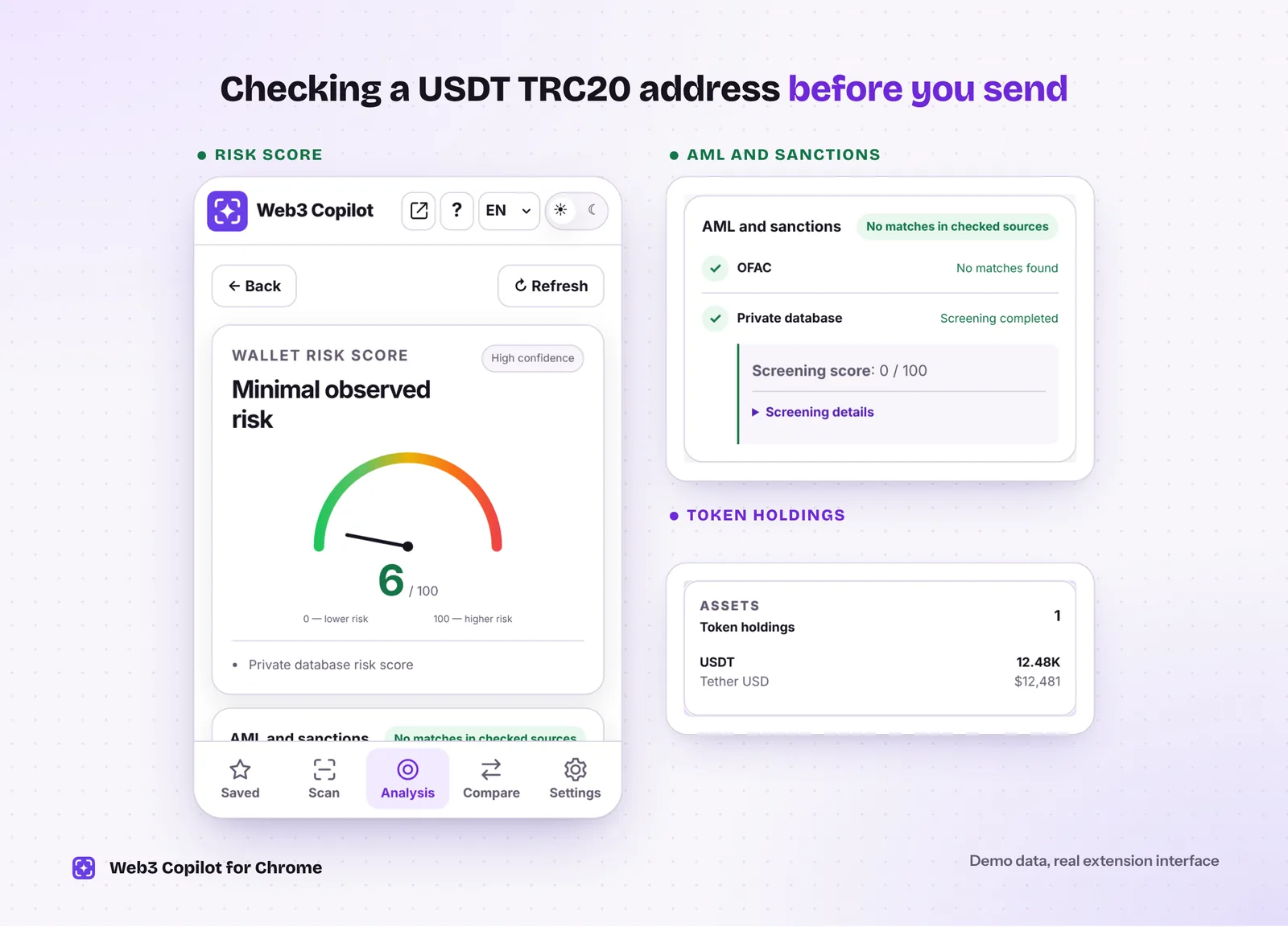 What a clean result looks like: a low score, each AML source checked separately, and the USDT the wallet holds. Demo data in the real Web3 Copilot interface.
6. Have enough TRX for the fee
Sending USDT on TRON does not use USDT for the fee. It uses network resources called energy and bandwidth, which you pay for in TRX. Keep some TRX in the sending wallet. Two things to know:
- Sending USDT to an address that has never held USDT costs more energy, often about twice as much.
- If a transaction runs out of energy, it fails, and the TRX already spent on it is not refunded.
Your wallet usually shows the estimated fee before you confirm. If it looks unusually high, check that you are sending to the right address.
7. Send a small test for large amounts
For a large transfer, send a small amount first and ask the recipient to confirm they received it. It costs one extra fee and catches typos and wrong addresses. A test does not protect you from a scammer, who will happily confirm your test, so use it with the checks above.
Receiving USDT TRC20? Check the token too
Anyone can create a token named "USDT" or "Tether USD" with the real logo. Real USDT on TRON comes from one contract only:
TR7NHqjeKQxGTCi8q8ZY4pL8otSzgjLj6t
Open the incoming transaction on Tronscan and compare the token contract with this one, or with the list on Tether's website. If it does not match, you did not receive real USDT. This is the core of the flash USDT scam.
How Web3 Copilot helps
Web3 Copilot is a free Chrome extension that runs steps 3 and 5 for you:
- Open an address on Tronscan and the extension detects it. You can also paste any T address into the extension.
- Risk Score from 0 to 100, where higher means riskier, with the main reasons and a confidence level.
- AML and sanctions card with a separate result for each source, including the OFAC sanctions list. The report tells you what each source covered, so a missing check never looks like a clean one.
- TRX and TRC20 balances and recent transfers in one view, and an AI chat for follow-up questions.
No wallet connection, no signature and no seed phrase are ever needed. Steps 1, 2, 4 and 7 still depend on you.
Quick checklist
- The address starts with T, has 34 characters, and you chose the TRON (TRC20) network.
- You copied it from the recipient's own source, not from your history.
- Its Tronscan history fits what you were told.
isBlackListedreturns false.- The AML check shows no serious risk.
- You have enough TRX for the fee.
- For a large amount, the test transfer arrived.