Flash USDT: how the fake USDT scam works
Flash USDT does not exist. It is a fake token, a pending transfer or a fake screenshot. How the scam works, how to spot fake USDT in your wallet, and what to do.
By Web3 Copilot team4 min read
Flash USDT is a scam. There is no way to create USDT that looks real for a while and then disappears. Only Tether can issue USDT, and every real USDT transfer is final. What people call "flash USDT" is always one of three things: a fake token named USDT, a transfer that never confirmed, or a fake screenshot. Anyone selling flash USDT software is selling nothing, and anyone paying you with it is stealing from you.
What is flash USDT supposed to be?
Ads on Telegram, YouTube and code-sharing sites offer "flash USDT senders" or "flash USDT" for a fraction of the face value. The pitch is usually the same: the USDT shows up in any wallet, can be transferred and even spent, and vanishes after 30, 60 or 90 days.
That is impossible. USDT is a token controlled by one smart contract per network. A balance either exists in that contract or it does not. Nobody outside Tether can add to it, and nothing makes real USDT expire.
How the scam actually works
There are two sets of victims: people who buy flash USDT, and people who get paid with it.
Scam 1: selling "flash USDT software"
The buyer pays real crypto for the software or a "flash" package. They get nothing, a demo that only edits what their own screen shows, or malware that steals from their wallet. Then the seller asks for more money to "unlock" a bigger amount.
Scam 2: paying a seller with fake USDT
This is the version that hurts honest people, most often P2P sellers and small merchants:
- A fake token. The scammer creates their own token with the name "Tether USD", the symbol USDT and the real logo, and sends it to you. Your wallet shows an incoming "USDT" transfer, but the token is worthless.
- A transfer that never confirms. The scammer broadcasts a transaction with a fee that is too low. Some wallets show it as pending or even add it to the balance, but it never makes it into the blockchain.
- A fake screenshot or fake notification. The scammer sends an edited screenshot of a "successful" transfer, or a link to a fake explorer page, and pushes you to release the goods or crypto right away.
In all three cases, the scammer asks you to act fast, before you check.
How to tell if the USDT you received is real
- Open the transaction on a block explorer, such as Tronscan for TRON or Etherscan for Ethereum, not on a link the sender gave you. Type the address of the explorer yourself.
- Check the status. It should say confirmed or success. Pending or failed means you have received nothing.
- Check the token contract. Real USDT comes from one official contract per network. On TRON it is
TR7NHqjeKQxGTCi8q8ZY4pL8otSzgjLj6t. On Ethereum it is0xdAC17F958D2ee523a2206206994597C13D831ec7. Tether lists all its official contracts on its website. - Look at the value. Wallets usually show a dollar value for real USDT. A "USDT" token with no price, or a warning such as "unverified token", is a red flag.
- Check the balance where it counts. If you sell on an exchange P2P platform, release only when the platform itself shows the payment as received.
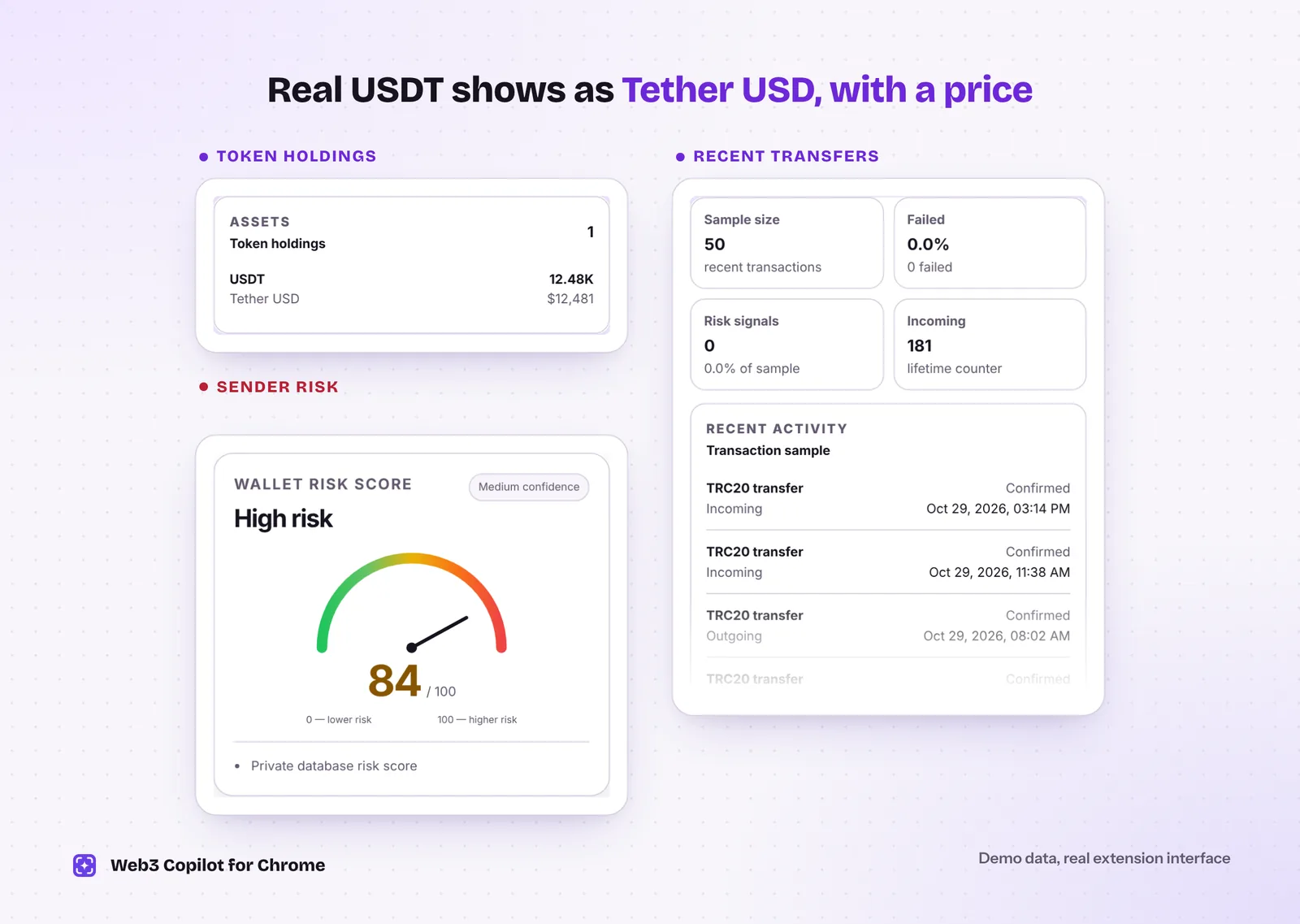 Real USDT shows up as Tether USD with a dollar value. The sender's risk score and history tell you who you are dealing with. Demo data in the real Web3 Copilot interface.
Red flags in a flash USDT deal
- Someone offers USDT for less than its face value.
- The buyer insists on paying outside the P2P platform's escrow.
- You get a screenshot instead of a transaction ID.
- The buyer or "support" asks you to pay a fee to "activate" or "unlock" the received USDT.
- A website asks you to connect your wallet to "verify" a transfer.
What to do if you were targeted
- Do not send anything else. No activation fees, no "verification deposits".
- Do not interact with the fake token. Do not try to sell or swap it. Some fake tokens are tied to sites that ask for wallet approvals and drain real funds.
- Save the evidence: transaction IDs, addresses, chats and screenshots.
- Report it to the P2P platform or exchange, to the police, and in the U.S. to the FBI at ic3.gov.
- Ignore recovery offers. Anyone who contacts you offering to get the money back for a fee is running a second scam.
How Web3 Copilot helps
Web3 Copilot is a free Chrome extension for checking any address before you deal with it:
- See the token holdings and recent transfers of your own wallet or the sender's, across 14 networks including TRON, Ethereum and BNB Smart Chain.
- Check the sender's Risk Score from 0 to 100 with the reasons behind it, and the AML and sanctions results.
- Open an address on Tronscan or Etherscan and the extension detects it automatically.
It only reads public blockchain data. It never asks you to connect a wallet or sign anything. For the full routine before sending USDT, read how to check a USDT TRC20 address. For other ways scammers fake your history, see address poisoning.